 FarryOn
Privacy and your data
What FarryOn keeps, what it never does, and three controls in the app: stop keeping your conversations, delete them, or delete your whole account. No email to us needed.
In short
| Never kept | Kept for you |
|---|---|
| Your voice — it's streamed only while a session runs and never stored. Photos you ask about — used to answer, then dropped. Your email and Telegram logins — they stay in your phone's secure storage. |
Notes, reminders and saved contacts you made on purpose. A text record of your conversations — only while the switch below is on. |
1Where to find it
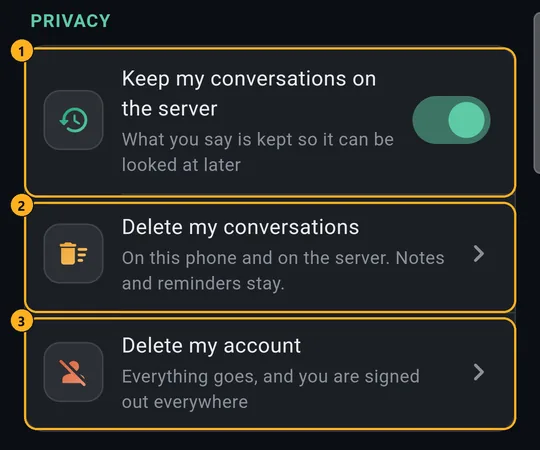
Open the menu ⋯ → Settings and scroll to Privacy:
2Keep my conversations — on or off
It's on to start with: a text record of what you said and what Farry answered is kept on our server, so it's there on any phone you sign in on.
Switch it off and from then on:
- the server keeps nothing of what you say;
- its tool log only notes that a tool ran — not what was in it;
- no record of the text of messages Farry sends for you.
Notes and reminders you ask for are still saved — you asked for those on purpose.
3Delete my conversations
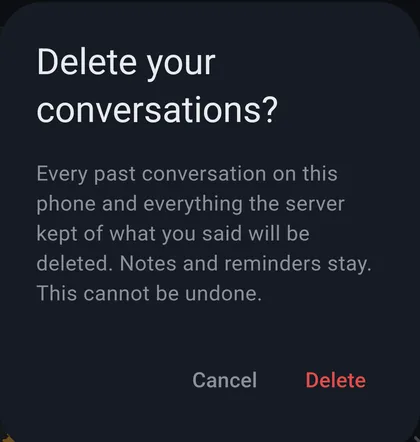
Tap Delete my conversations, then Delete.
Every past conversation on this phone and on the server is deleted, along with the tool log and sent-message records. Your notes and reminders stay.
4Delete my account
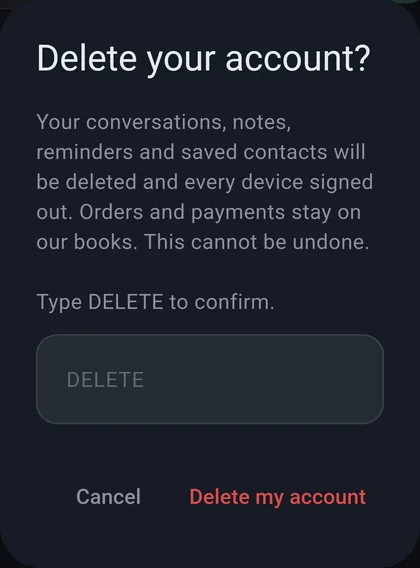
- Tap Delete my account.
- Type DELETE in the box.
- Tap Delete my account.
Your conversations, notes, reminders and saved contacts are deleted, and you're signed out on every phone. Orders and payments stay on our books, for our accounts. You can sign up again later with the same email — as a new, empty account.
5How long things are kept
| What | How long |
|---|---|
| Conversation record | Until you delete it — only kept while the switch is on |
| Tool log (which tool ran, and whether it worked) | 30 days, then deleted by itself |
| Record of messages sent for you | 7 days, then deleted by itself — none with the switch off |
| Notes, reminders, saved contacts | Until you delete them, or your account |
| Voice and photos | Never stored |
The full detail is in our privacy policy.
?If something goes wrong
| What you see | What to do |
|---|---|
| “Couldn't reach the server — nothing was deleted” | Check your internet and try again. Nothing was half-deleted. |
| “Please sign in again” | Your sign-in expired. Sign in, then try again. |
| The Delete my account button does nothing | Type DELETE exactly in the box first. |
| Old chats still show after switching off | That's this phone's own copy — use Delete my conversations. |
Still stuck? Message us on WhatsApp — a real person answers.
Sat–Thu, 10:00–19:00 GST